
KORA Productivity 
The shop floor in real time.
Mobility for the production line. Every quantity, stoppage and defect is logged the moment it happens, and the ERP responds in seconds.
What it is,
in context.
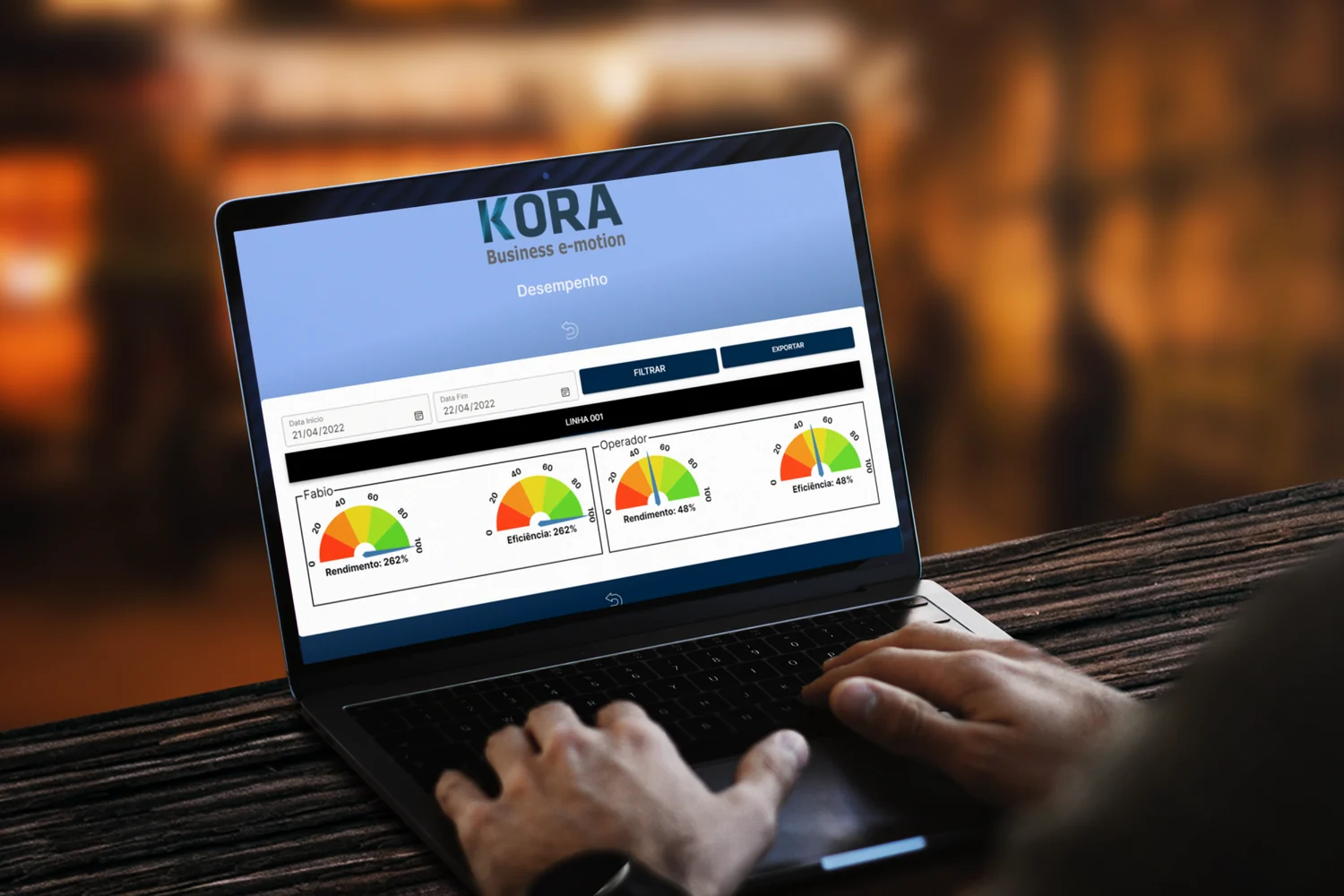
KORA Productivity brings the ERP to the shop floor. The operator logs quantities produced, stoppages and defects on an Android terminal on the line, and the central system updates work orders, consumption, traceability and OEE within seconds. That immediacy changes the conversation: the unannounced stoppage is no longer discovered in the end-of-month report; it is visible to the section head in an alert two minutes later.
OEE stops being a theoretical figure calculated on Saturdays; it becomes a live gauge everyone watches. In typical implementations, customers recover 10 to 20 percentage points of OEE in the first six months — because bottlenecks become visible, not because people work harder.
Features
your team
will feel.
- 01Production logging via mobile terminal
- 02Standard vs. actual times per workstation
- 03Real-time OEE calculation
- 04Batch-by-batch traceability
- 05Automatic deviation alerts
- 06Native integration with MULTI
What lies beneath.
Architectural and technical decisions that set KORA Productivity apart from a generic product in the category.
01OEE in real time, not in a monthly spreadsheet
OEE in real time, not in a monthly spreadsheet
Availability × performance × quality calculated from operator logs and configured standard times. Every workstation, every shift, every order — OEE is always available on a dashboard. The ability to intervene early is where the value lies. An 8-point drop on a line at 10 a.m. does not wait for the Friday meeting.
02Integration with PLCs and data collectors
Integration with PLCs and data collectors
Where the plant's instrumentation justifies it, KORA connects to PLCs via OPC-UA or Modbus, captures machine counters, production states and alarms, and complements them with manual operator logs for everything the PLC does not see (visual defects, setups, micro-stoppages). In operations where instrumentation is not justified, KORA works 100% with manual logs.
03Operational traceability
Operational traceability
Each work order accumulates history: which operator worked, at which station, when, with which raw material (by batch), how many good pieces, how many rejects. Customer audits (fashion, branded footwear, home textiles for international chains) stop being archaeology and become direct look-ups.
04Alerts and management by exception
Alerts and management by exception
Management by exception replaces management by meetings. Configurable rules — 'if a stoppage exceeds X minutes', 'if scrap exceeds Y%', 'if the deviation from standard time exceeds Z%' — trigger notifications to the right person. Management no longer has to chase information.
It talks to the rest of your ecosystem.
It integrates natively with INFOS products and with market tools via open APIs.
 INFOS product
- Time-clock systemsMarket solution
- Data collectorsMarket solution
From assessment to go-live.
Every project is different, but the arc is stable. The phases accommodate real complexity, not an ideal schedule that does not survive the first meeting.
- 01
Phase 1 · Workstation mapping
Each workstation, each standard time and each stoppage reason is documented on the floor with the operators themselves. This is the basis for configuring the system, not a list imported from a catalogue.
- 02
Phase 2 · Configuration + training
Configuration in KORA + integration with the ERP. Training by role: operator (5-10 minutes), section head (1h), production director (2h). An interface designed to minimise friction on the floor.
- 03
Phase 3 · Pilot + roll-out
A pilot on one line for 2-4 weeks to fine-tune standard times and stoppage reasons. Phased roll-out to the remaining lines with INFOS on-site support.
- 04
Phase 4 · Data culture
The first 3 months of use establish the culture — the daily meeting changes, the dashboard stays in view, alerts start to trigger action. INFOS stays alongside until the habit stabilises.
For those who
like the detail.
Information for IT, compliance and procurement teams. If you need further detail, the INFOS pre-sales team replies within 24h.
- Rugged industrial or robust consumer Android terminals (7" to 10")
- Offline mode with automatic synchronisation
- OPC-UA (industrial PLCs) and Modbus integration
- Native integration with MULTI (bi-directional)
- Configurable OEE calculation (standard or custom rules)
- Multi-language support (PT, EN, ES, FR, AR)
- Hosting on own infrastructure or INFOSCloud
The most common questions
about KORA Productivity.
Answers distilled from hundreds of implementations. Missing one? Ask us directly.
Which devices does it support on the shop floor?
Android industrial terminals, robust Android/iOS smartphones and tablets. The interface adapts to small screens and difficult lighting conditions. It works offline with automatic synchronisation.How is OEE calculated?
OEE = Availability × Performance × Quality. KORA Productivity gathers these three in real time from operator logs (stoppages, quantities, defects) and compares them with the defined standard times.Does it integrate with machines/PLCs?
Yes. KORA connects to PLCs via OPC-UA or Modbus. It can also work only with manual logs on terminals — useful for operations where investment in instrumentation is not justified.Does it replace my time-clock system?
Not directly. KORA Productivity focuses on production logging; it integrates with existing time-and-attendance systems (Idonic, Timbragem, others) to cross-reference attendance with production.
Other products in the same layer.
Where the product is born. Every operator gesture feeds the system — quantities, times, stoppages, quality. Faster decisions start here.
Let's talk.
We'll come back within 24h with next steps.
No complicated forms. One email or call, a team that knows your sector, and a concrete path forward — whether MULTI, MAXIRETAIL, KORA, PPLPORTAL or infrastructure.